Security & Permissions
Exactly what root asks for, and exactly what stays local
root is intentionally small. The current Chrome beta package is Manifest V3, asks for one narrow permission, stores your workspace in the browser, and does not need a root account or remote server to hold your notes.
At a glance
Trust should come from specifics, not vibes
The current Chrome beta package replaces the new tab page, opens a Quick Capture popup, and uses
activeTab only when you deliberately ask root to include the current page. Your workspace content
stays local unless you intentionally copy, export, or share it yourself. The app also surfaces
Last backup and Workspace health locally, so safety is visible inside root instead of living only in the docs.
What Chrome asks you to approve
The current Chrome beta package does two visible things in Chrome: it can become your new-tab workspace, and it can temporarily look at the active tab when you use Current page in Quick Capture.
New tab override
Chrome tells you root can replace the page you see on a new tab because the workspace can live there. If you prefer, you can still use one pinned root tab instead.
activeTab
root asks for activeTab, not broad always-on site access. That lets Quick Capture read the active page title and URL after you invoke the extension and choose to include the current page.
No broad host permissions
The current beta package does not request <all_urls>, Google host permissions, or a long list of site permissions. It is not asking to watch every site in the background.
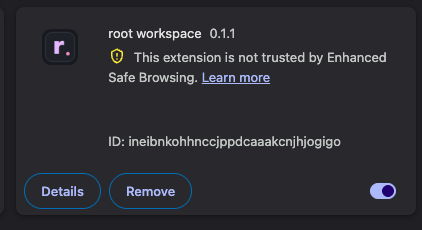
You may also see Chrome say the extension is not yet trusted by Enhanced Safe Browsing. For a newly published extension, that warning is usually about trust age and reputation history, not an extra hidden permission from root.
What root reads in the current beta package
Workspace content
Your items, snippets, task lines, tags, and local version history live in the browser. root reads that local workspace so it can show the app itself.
Current page title + URL
When you open Quick Capture and turn on Current page, root reads the active tab title and URL so it can append a source block into your workspace.
That is the important boundary: the current beta package reads the page title and URL for that one active tab after your action. It does not scrape full page text just because root is installed.
What root does not read by default
What network requests happen
For workspace content, the current Chrome beta package is local-first. Your notes are not uploaded to a root server just because you type into the workspace.
- No root account is required to use the current workspace.
- No remote server is required for the current workspace content.
- No cloud sync is included in the current Web Store package. Export and import are deliberate file actions.
- Copy, export, and browser AI use are all user-triggered. Something leaves root only when you intentionally copy, paste, export, or share it.
- Opening external links is still normal web behavior. If you click out to the Web Store, support docs, or another website, that page loads like any other website would.
Backup status and Workspace health are also generated locally from the same in-browser workspace. Opening those views does not upload your notes to a root service.
How to verify this yourself
- Open
chrome://extensionsand inspect the root listing. You can confirm the current permission set and see that the build is Manifest V3. - Use Inspect views on
newtab.htmlor the popup if you want to watch root directly in Chrome DevTools. - Open the Network tab in DevTools, then type in root, edit notes, or append something into Inbox. You should not see workspace content uploading to a root server.
- Try Quick Capture with and without Current page. You will see that the source block comes from the active tab title and URL only after you choose to include it.
If you want the broader local-first explanation too, the best companion pages are Privacy and Support.