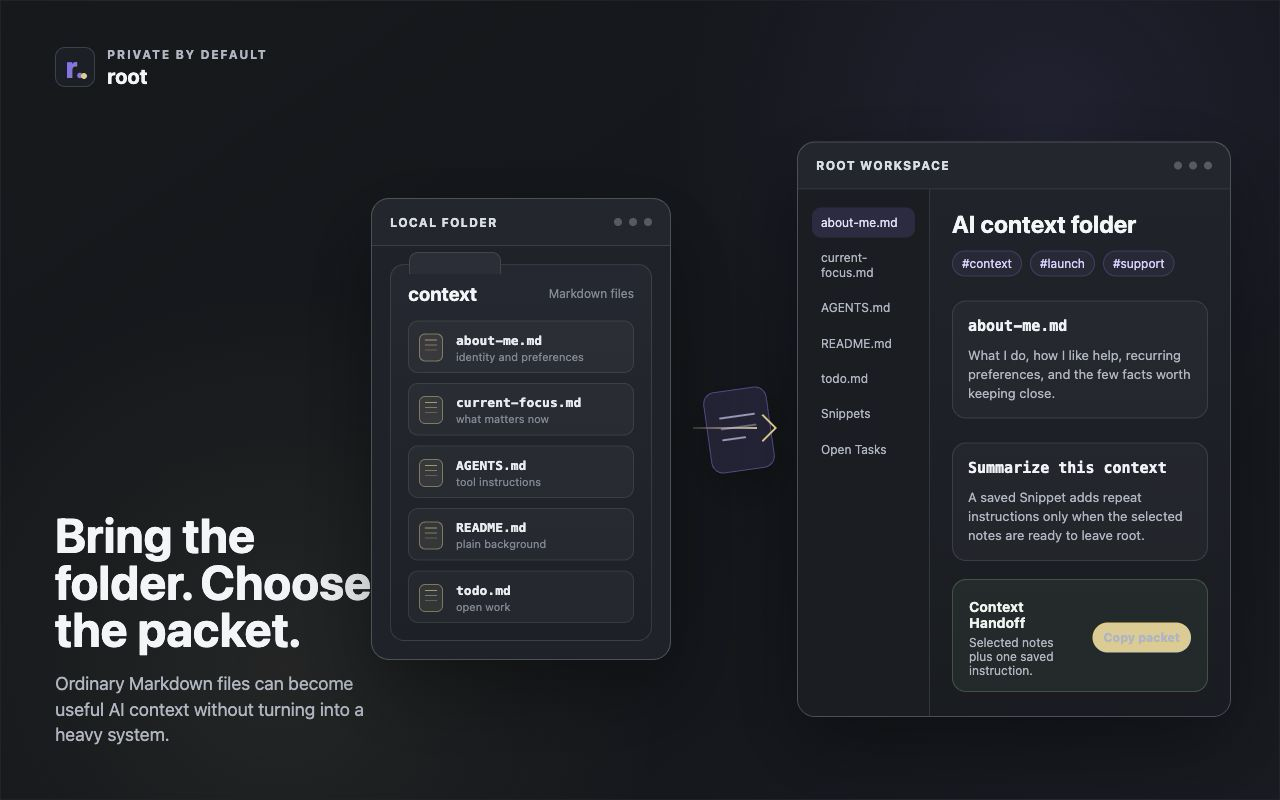
The easiest AI context system is usually not a system yet.
It is a small folder of plain text: who you are, what you are working on, what is still undecided, what already changed, and what you want an assistant to do with the material.
root fits that middle step. You can keep the files as normal Markdown, drag or import them into root, tag the related notes, save repeat instructions as Snippets, and use Context Handoff when a selected packet is ready for ChatGPT, Claude, Gemini, or another AI tool.
Start with one identity file
Make about-me.md first. Not a memoir. Not a permanent profile. Just a small context file
that helps repeated AI conversations start with the basics already clear.
It might hold:
- what you do
- how you like help structured
- recurring tone preferences
- constraints you repeat often
- things an assistant should not assume
Keep it plain. A useful about-me.md can be a short list that takes five minutes to write
and one minute to revise later.
Add a few working files
After that, add only the files you already have a use for. A simple folder might include:
current-focus.mdfor what matters this weekopen-questions.mdfor decisions that still need thoughtdecisions.mdfor what already changed and whytodo.mdfor plain checklist linesnotes.mdfor rough fragments that do not need a title yetlinks.mdfor references with a sentence of contextdraft.mdfor the current thing you are trying to writemeeting-notes.mdfor raw notes before they become follow-upsproject-brief.mdfor the short version of the work
In the current Chrome beta, root supports importing or dragging one or more .md or
.txt files into the workspace. That makes this setup low-ceremony: ordinary files can stay
ordinary until you want to work with them together.
Keep existing tool files when they help
Some people already have AI or development-adjacent Markdown files near their work. root does not require any of these special names, but it can work with them because they are still just portable Markdown files.
Recognizable examples include:
README.mdfor basic backgroundCHANGELOG.mdfor what changed over timeCONTRIBUTING.mdfor rules and expectationsAGENTS.mdfor agent-facing instructionsCLAUDE.mdfor Claude-specific working notesGEMINI.mdfor Gemini-specific working notes
Treat these as examples, not requirements. If you already have them, they can become useful context.
If you do not, start with about-me.md and the few working files that match your real work.
Use tags instead of a heavy visual dashboard
The point is not to build a visual command center for your life. root stays light on purpose: tags group related context when it is useful, without turning your working files into another system to maintain.
You might tag about-me.md, current-focus.md, and project-brief.md
with #launch. Or tag links.md, meeting-notes.md, and
open-questions.md with #support. The tag is enough to gather the slice later.
A simple tag is enough to bring related context back together when you need it.
Save repeat instructions as Snippets
The context files are the material. Snippets are the repeat instructions you reach for again and again. Save the reusable move once, then add it only when the packet is ready to leave root.
Good starter Snippets include:
summarize this contextextract open tasksturn this into a support replywrite a product updatemake this clearer without making it formal
This keeps reusable instructions close without turning the main workspace into a prompt archive.
Use Context Handoff for the actual AI chat
The handoff is where the setup earns its keep. Instead of pasting a whole folder into an assistant, choose the current item, selected notes, a tagged slice, pinned context, or Open Tasks. Add a saved Snippet if the packet needs framing, then inspect what is about to leave.
That packet can go into ChatGPT, Claude, Gemini, browser AI, email, a doc, or another tool. The important part is that the packet is deliberate. The assistant gets the useful working context, not every nearby file just because it happened to be in the folder.
Private by default, honest at the boundary
root's local workspace data is private by default. The notes stay in your local workspace unless you choose to copy, export, or share them.
Once you paste or share a Context Handoff packet into an AI chat, that tool may see the context you gave it. That is why the boundary matters: root helps you decide what belongs in the packet before it leaves.
A 10-minute starting folder
If you want the smallest useful version, make this folder:
about-me.mdcurrent-focus.mdopen-questions.mdtodo.mdlinks.md
Drag those files into root. Tag the ones that belong together. Save one or two Snippets for repeat instructions. Then use Context Handoff the next time you want AI help on the current slice.
That is enough to start. The structure can grow only when the work asks for it.