Copy the ones you want, save them as Snippets, and keep shaping the real material locally. Downloadable packs or import bundles can come later if they stay practical.
How a snippet becomes useful inside Context Handoff
This is the move that makes Snippets worth keeping. Save the reusable text once, then add it only when the real context is ready to leave root.
Save the reusable text
Keep the repeated instruction, format, or reply starter in Snippets instead of leaving it buried in an old note.
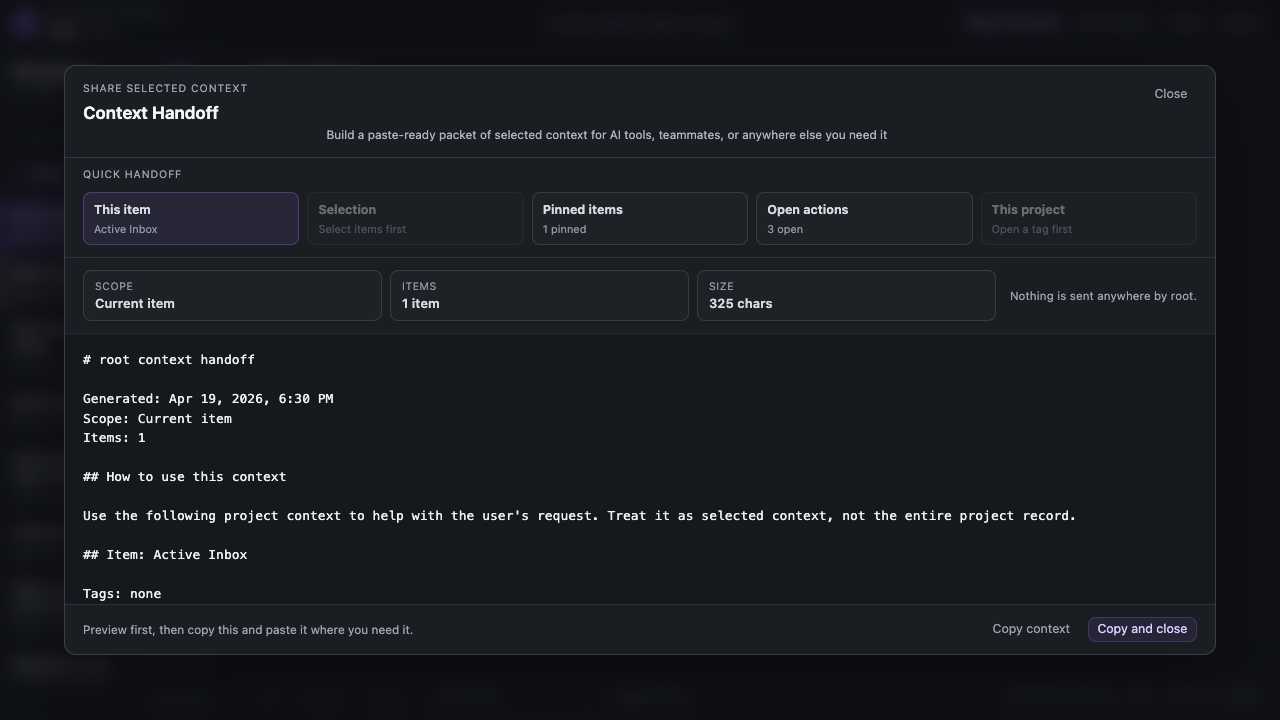
Open Context Handoff
Choose the current item, selected items, a project slice, pinned context, or Open Tasks.
Click Add prompt
Pick the saved snippet so the framing appears above the selected context instead of living inside the note forever.
Copy or share the packet
Inspect the packet, keep or remove metadata, then copy or share only the piece that actually needs to leave root.
Two small workflow packs
These are examples, not a marketplace. The goal is to help people start with a small useful shelf instead of turning Snippets into another system to manage.
Example pack
Builder/Product Ops pack
Start here if bugs, decisions, release notes, and follow-up tasks keep colliding in the same working pile.
- Summarize this context
- Extract open tasks
- Bug report
- Decision note
- Release check
- Changelog entry
Example pack
Support/feedback pack
Start here if rough customer notes, support drafts, bug complaints, and saved links keep feeding the same work loop.
- Summarize this context
- Link note
- Product feedback
- Support reply
A content creator pack can come later, but the general starter set already covers a lot of that early work: summary, decisions, link notes, and reusable framing.
Example set
Start small. You do not need all of these. Pick the ones that match the rough work you already do and save only the versions you expect to reuse.
Summarize this context
Use when the material is rough, long, or mixed together and you need the shape first.
Summarize the useful context below.
Return:
- short summary
- open questions
- contradictions or risks
- next actions
Keep it concise and do not repeat the same point twice.
Extract open tasks
Use when notes, links, and follow-ups are mixed together and the actions are hiding in the text.
Read the context below and pull out only the real action items.
Return:
- task
- owner if known
- due date if known
- blocker if mentioned
Do not invent tasks that are not implied by the text.
Bug report
Use when you have rough notes, screenshots, repro scraps, or support complaints that need a cleaner issue write-up.
Turn the notes below into a clean bug report.
Return:
- title
- expected behavior
- actual behavior
- steps to reproduce
- environment
- severity
- open questions
Flag anything missing.
Decision note
Use when discussion happened in fragments and you want one calm record of what changed and why.
Turn the context below into a decision note.
Return:
- decision
- why it was made
- options considered
- tradeoffs
- owner
- follow-up
Keep it factual and low-drama.
Meeting notes
Use when you have a rough meeting dump and need the useful parts separated fast.
Turn the rough meeting notes below into:
- decisions
- open questions
- follow-ups
- risks
- parking lot
Keep names and dates when they are present.
Release check
Use when a launch or update is moving and you need one clear pass over what still matters.
Use the context below to prepare a release check.
Return:
- what is shipping
- what changed
- known risks
- user-facing copy needed
- verification checks
- rollout or rollback notes
Link note
Use when a saved link needs a little context so it does not become a dead bookmark later.
Turn the saved link and notes below into a useful link note.
Return:
- what this link is
- why it matters
- what to do with it
- tags or bucket suggestions
Keep it short enough to scan later.
Product feedback
Use when user feedback is emotional, messy, or scattered and you need the product signal inside it.
Turn the feedback below into a product note.
Return:
- user problem
- requested outcome
- evidence or quote
- severity or frequency
- likely next step
Separate facts from interpretation.
Support reply
Use when the answer should be calm, direct, and useful without turning into a long support essay.
Draft a support reply from the context below.
Requirements:
- clear and calm
- direct answer first
- next steps if needed
- no extra hype
- do not promise features or timelines unless stated
Changelog entry
Use when the product note exists but the release wording still needs to become cleaner and more public-facing.
Turn the notes below into a changelog entry.
Return:
- short headline
- what changed
- why it matters
- limits or caveats if any
Keep it plain and specific.
Save fewer snippets, reuse them more often, and let the active note keep the live work.
If you only save three to start, a good first pass is Summarize this context, Extract open tasks, and one domain-specific starter such as Bug report or Support reply.